Planning an online assessment day for 300 candidates
Three hundred applicants have to take the same 60-minute skills test, all on one day. Some will sit it in your training rooms, some from home. The test itself is ready; what decides whether the day goes well is everything around it: how many people sit at the same time, how they get in, who helps when a laptop dies at minute 40, and what happens if the room's Wi-Fi drops.
This guide plans such a day step by step. The numbers are an example; swap in your own. It applies whatever platform you use, and points out where ExamQR helps.
1. Decide how many sit at the same time
The first decision is the shape of the day: everyone at once, or in sessions. Three limits set it, and the smallest one wins:
- Seats. Desks or computers in your rooms, if candidates come on site.
- People. Invigilators in the rooms, plus at least one person free to fix technical problems.
- The platform. Many online exam systems cap how many candidates can be taking a test at the same moment. Check yours before you plan, not on the morning.
For our example, 300 candidates and a 60-minute test, with rooms for 100:
| Session | Arrive | Test | Candidates |
|---|---|---|---|
| Morning 1 | 8:45 | 9:00 to 10:00 | 100 |
| Morning 2 | 10:45 | 11:00 to 12:00 | 100 |
| Afternoon | 13:45 | 14:00 to 15:00 | 100 |
Leave at least 45 minutes between sessions: late starts, extra time for candidates who are entitled to it, and resetting the room all eat into the gap. Keep a few spare places in each session for people who must change at the last minute.
2. Check the platform's limit
In ExamQR, the limit is the number of candidates taking a test at the same moment, across all exams of your account:
- Free: 30. Personal: 100. Organization: 500. Enterprise: as agreed.
- Registering candidates and opening sessions is never blocked. The limit applies when a candidate starts the test.
- Above it, a candidate who arrives waits in a waiting room that tries again by itself every few seconds and lets them in as soon as someone submits.
- A candidate who is already taking the test is never cut off, even if they reload the page or reconnect.
So the example plan fits the Personal plan, one session of 100 at a time, and putting all 300 in one session needs Organization. Remember that another exam running on the same account at the same time counts too.
When a session holds more candidates than your plan lets sit at once, the subject's candidate list says so, days before the exam:
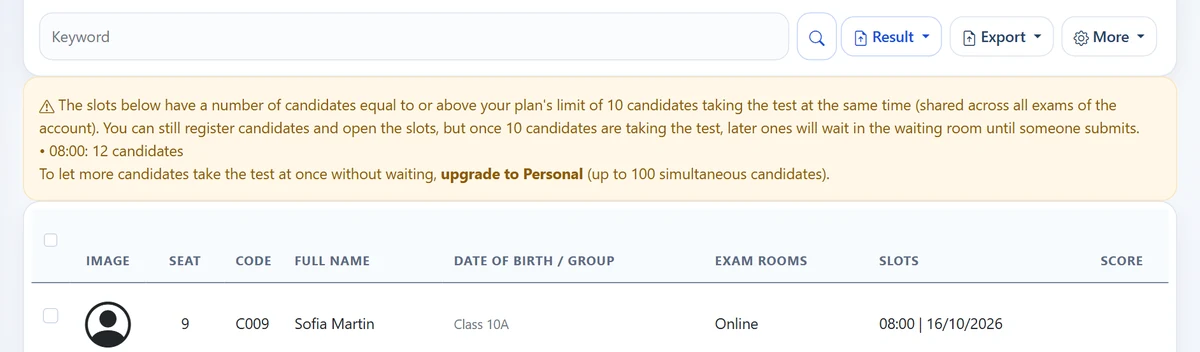
Waiting costs time only in one case. With Flexible time per candidate, each candidate's time starts when they get in. With Fixed start and end time, everyone stops at the same moment, so minutes spent waiting are lost. For a fixed-time session, keep the number of candidates within the limit.
3. Fill the sessions
Let candidates choose their own session rather than assigning 300 people by hand. Open registration with each session's seat limit (paid plans), so a session closes when it is full, and send a confirmation with the date, the time and how to sign in. See how to run sign-ups for an assessment day.
4. Make sign-in fast
A hundred people typing an exam code, a username and a password at the same time is the slowest part of any session. Give each candidate a personal sign-in link or QR code instead: in the confirmation email for remote candidates, and on an entry card handed out at the door on site. Keep the typed details as a fallback for computers without a camera. See sign-in QR codes on entry cards.
5. Seats and rooms on site
Spread each session over the rooms so that people who know each other, or who have the same version of the test, do not sit side by side, and print a seating plan for the door and a register for each room. The free seating plan tool does this from a spreadsheet; see how to make an exam seating plan. Give each session several versions of the test, so neighbours' screens do not help; see how to shuffle a test fairly.
6. Network and devices
- Test the room network with a full room. Ask as many devices as the session will have to open a practice test at the same time, at the same time of day. A network that works for ten laptops may not for a hundred.
- Have a fallback connection, such as a mobile hotspot, and know who can restart the router.
- Charge everything and put power strips where the laptops are.
- Remote candidates: send the device and browser requirements a week ahead, with a short practice test, so problems surface before the day.
7. When something goes wrong
Write down what staff should do before the day, so nobody improvises:
- A laptop dies. The candidate signs in again on another device and continues with the answers saved so far. ExamQR keeps the time on the server, so the clock is not reset. If the subject limits how many times a candidate may sign in, allow for this case.
- The connection drops. Answers are kept in the browser while the connection is down and saved to the server regularly; after a reload, the candidate continues where they stopped.
- A candidate lost time through no fault of their own. The invigilator gives them extra minutes from the exam monitor.
- Somebody's card is lost. Reset that candidate's password and print a new card; the old one stops working.
A timeline for the day
| When | What |
|---|---|
| Three weeks before | Choose the sessions, check the platform's limit, open registration with seat limits. |
| One week before | Send device requirements and a practice test to remote candidates; brief invigilators on the incident plan. |
| Two days before | Close registration; check the number of candidates per session against seats and the platform's limit; make the seating plans. |
| The day before | Test the room network with a full room; print entry cards, seating plans and registers. |
| On the day | Open the doors 15 minutes before each session; watch the monitor; keep one person free for technical problems. |
| After | Mark open answers, rank the candidates, decide and tell each one their result. |
Questions
Can 300 candidates take the test at exactly the same time on ExamQR? Yes, on the Organization plan, which lets up to 500 sit at once. On Personal, run sessions of up to 100.
What does a candidate see if the limit is reached? A message that the exam room is full and a short wait. The page tries again by itself and lets them in as soon as someone submits.
Is there a one-day pass for a single large event? No. Choose the plan that fits your largest session; you can change plans afterwards. See pricing.
What happens after the test? See how ExamQR takes a hiring round from registration to the shortlist, including ranking and result emails.